
BloomDraft vs Ghost CMS: Direct Publishing Guide
Ghost and BloomDraft aren’t trying to do the same job, but they do touch the same surface area: the editor.
If you’re evaluating a bloomdraft ghost integration, the real question is upstream vs downstream. Where do drafts get created, reviewed, and governed—before they land in the CMS your readers actually use?
What each tool is responsible for (in real life)
Ghost is the publishing layer. It’s where your posts live, your theme renders, your newsletters send, and your memberships get managed.
BloomDraft is the content pipeline. It’s where you turn keyword inputs into draft inventory—topics, outlines, and articles—then push them into Ghost through the Admin API.
A clean mental model:
- Ghost: website, email, members, paywalls, authors, tags, final formatting
- BloomDraft: keyword research, topic clustering, draft generation, bulk scheduling into your CMS
Direct comparison (quick scan)
| Feature | Ghost CMS | BloomDraft |
|---|---|---|
| Content creation | Manual writing/editing in Ghost editor | AI-assisted generation from keywords |
| SEO research | You bring your own tooling/process | Generates clusters + SEO metadata |
| Publishing destination | Native (site + newsletter + members) | Pushes content into Ghost via API |
| Membership + subscriptions | Built-in tiers, Stripe, email delivery | Not a membership product |
| Volume publishing | Fine one post at a time | Designed for bulk output + scheduling |
| Workflow style | Editorial CMS workflow | Production pipeline + review gate |
| Pricing shape | CMS subscription | Per-plan content volume + integrations |
How the BloomDraft → Ghost integration works
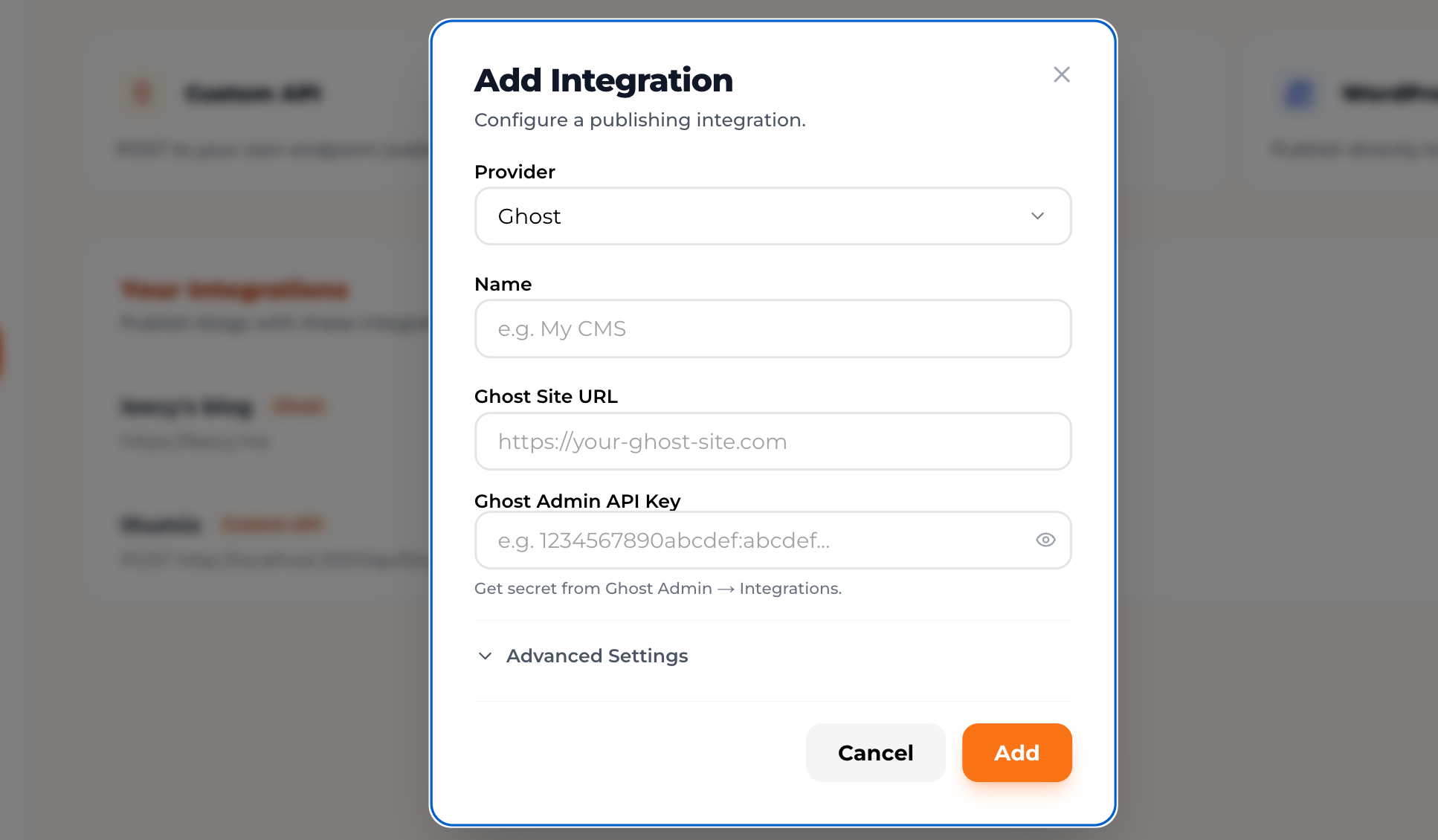
You connect BloomDraft to Ghost using an Admin API key and your site URL. Once connected, BloomDraft can create posts in Ghost as drafts, scheduled posts, or published posts.
Setup steps (Admin API key flow)
- In Ghost Admin, go to Settings → Integrations
- Click Add custom integration
- Name it (e.g., “BloomDraft”) and copy the Admin API key
- In BloomDraft, go to Settings → Integrations → Ghost
- Paste the API key and your Ghost URL (for example,
https://yourdomain.com) - Run the connection test
Publishing options you control per article:
- Publish now: goes live immediately in Ghost
- Schedule: sets a future publish date/time in Ghost
- Save as draft: lands in Ghost as an unpublished draft for manual review
What BloomDraft typically sends into Ghost
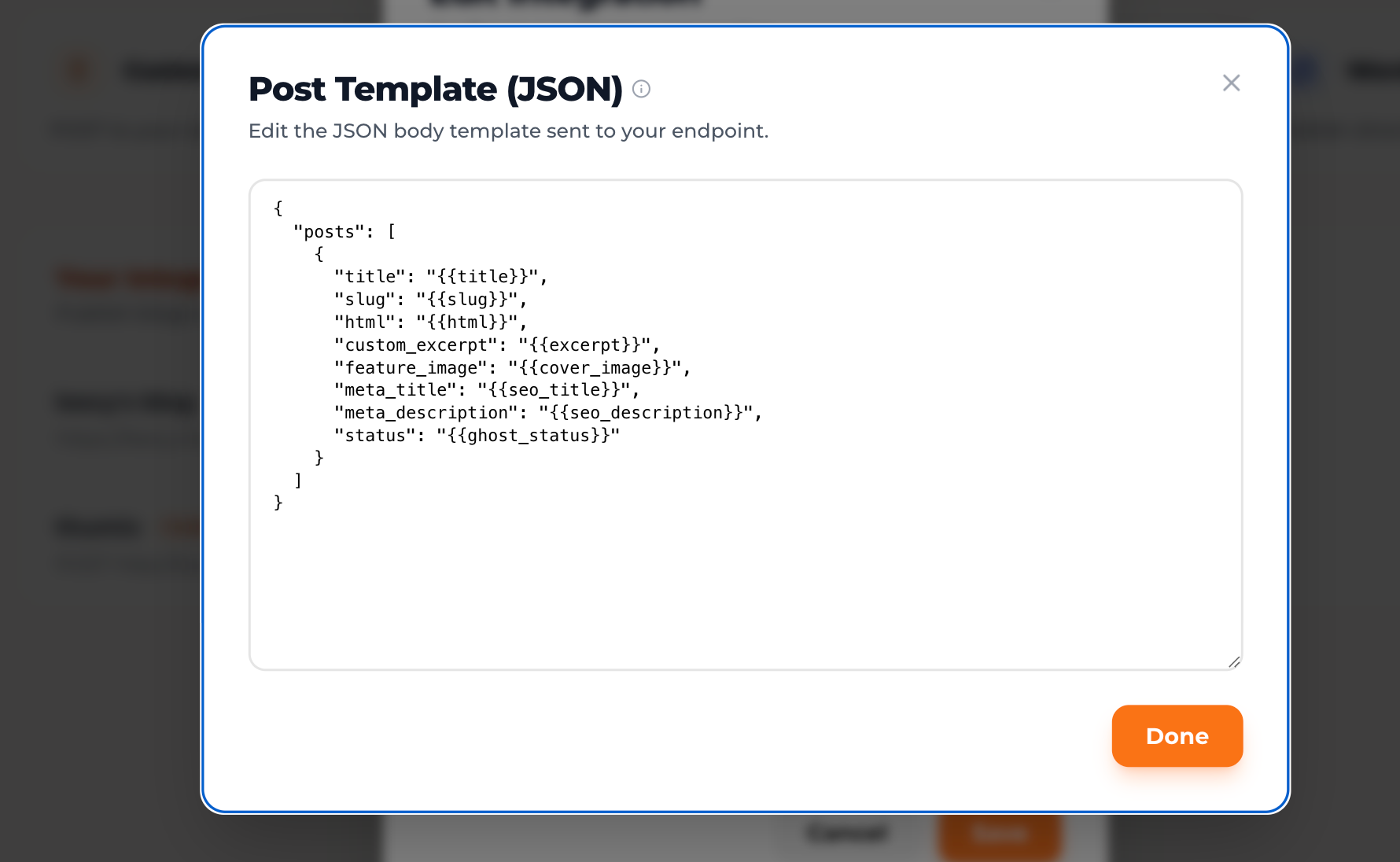 When you publish from BloomDraft, Ghost receives a native post you can still edit normally.
Common fields passed through:
- Markdown body content
- Title + slug
- Meta title + meta description
- Feature image (if enabled)
The part most people skip: QA guardrails for AI-assisted posts
If you’re using BloomDraft for SEO volume, the risk isn’t “AI wrote it.” The risk is quietly publishing content that looks fine but fails basic editorial and search-quality checks.
Treat BloomDraft as a draft factory, not an autopilot. Your process matters more than your prompt.
A practical pre-publish checklist (works well with Ghost)
Accuracy + trust
- Verify facts, numbers, and claims that sound specific (dates, pricing, legal/medical advice, benchmarks).
- Add at least 1–2 primary sources where appropriate (docs, standards, reputable studies).
Uniqueness (the SEO part that actually bites)
- Add a concrete example from your product, your workflow, or your industry.
- Replace generic “best practices” sections with decisions you’ve made (tools used, constraints, trade-offs).
Structure + intent
- Make the intro answer the query fast, then expand.
- Ensure headings match the search intent (how-to vs comparison vs definition vs troubleshooting).
Internal governance in Ghost
- Assign the correct author (real person, not “Admin”), and use consistent tags.
- Decide whether posts are public or members-only before scheduling.
- Add a lightweight approval step: drafts land in Ghost → quick pass for links, formatting, and brand voice → schedule.
Link hygiene
- Add internal links to your highest-converting pages (and older relevant posts).
- Check external links for spammy domains or dead pages.
Choosing the right setup (three patterns that don’t overlap)
Most teams don’t need a philosophical debate here. They need to know what breaks first: writing capacity, SEO planning, or editorial quality.
1) Ghost-only (manual publishing)
Pick this if your content is hard to fake—technical tutorials, reporting, sharp opinion, deep case studies—and you’re publishing at a pace humans can sustain.
A common range: ~4–8 posts/month, where research and revision time matters more than raw throughput.
2) BloomDraft-assisted publishing into Ghost (SEO inventory)
This fits when you need a steady drumbeat of search-targeted posts and you don’t have a staffed content team.
It tends to show up when you’re aiming for ~20+ posts/month or you want to build out clusters (support content, comparisons, “alternatives,” glossary pages) without spending weeks outlining.
3) Mixed model (AI for predictable formats, humans for high-signal posts)
This is the most defensible approach for many businesses.
Use BloomDraft for:
- SEO-driven guides and pillar pages
- How-to posts with repeatable structure
- Tool comparisons and alternatives pages
- Use-case pages where the framework is stable
Write directly in Ghost for:
- Product announcements (details matter)
- Founder voice/opinion (tone matters)
- Customer stories (proprietary inputs)
- Newsletters (timeliness + personality)
Pricing reality check (and what the math ignores)
Ghost pricing depends on the membership features and scale you need. BloomDraft pricing is shaped more by output volume and integration access.
Example monthly totals:
- Ghost Creator ($25/mo) + BloomDraft Pro ($29/mo) = $54/mo
- Ghost Business ($199/mo) + BloomDraft Max ($79/mo) = $278/mo
Freelance writing costs vary widely, but even a conservative range (say $0.10–$0.50/word) puts a 1,500-word post around $150–$750.
The part that doesn’t show up in subscription math: editing time. If AI-assisted posts take you 20–40 minutes each to QA and personalize, that’s still real cost—just paid in calendar time instead of invoices.
Setup gotchas (the ones that actually cause failures)
Admin API key security
- Treat the Ghost Admin API key like a password. Don’t paste it into docs, tickets, or public repos.
Slug collisions
- If BloomDraft generates a slug that already exists, Ghost will reject the create request.
- Fix: add a quick pre-flight step for high-volume batches (or use a naming convention that reduces repeats).
Feature images + brand consistency
- Auto-generated images can be useful for speed, but they often drift from brand (fonts, colors, layout rules).
- If your site depends on a consistent visual system, disable auto-image generation and attach images in Ghost (or standardize a template before uploading).
Scheduling at scale
- When scheduling lots of posts, space publish times out. API rate limits and background jobs can get noisy when you stack dozens of posts at the same timestamp.
The integration in practice (one month, realistic cadence)
Week 1: Build a topic cluster in BloomDraft using 3 seed keywords tied to your product and audience. Review the suggested ideas, pick 8, generate full drafts.
Week 2: Edit the 8 drafts in BloomDraft (or after they land as Ghost drafts). Tighten intros, add product-specific examples, add internal links, and verify claims.
- Publish 4 immediately
- Schedule 4 across the next two weeks
Week 3: Write 2 posts directly in Ghost that shouldn’t be “templated”: a product update and an opinion piece.
Week 4: Scheduled posts go live. You review performance in Ghost analytics (and whatever SEO tooling you use) and feed the winners back into next month’s cluster.
Output: 10 posts total (8 AI-assisted, 2 fully manual). The win isn’t magic automation—it’s removing the blank-page bottleneck while keeping editorial control.
Recommendation (without the looping decision tree)
If Ghost is already your home base, BloomDraft is worth adding when your constraint is draft production (topics, outlines, first versions) rather than publishing mechanics.
If you’re unsure, don’t “switch stacks.” Connect the integration, push a small batch as drafts, and judge the results on two things: editing time per post and actual search impressions over the next few weeks. That’s the only signal that matters.