Why Project Context Matters for AI-Generated Content
Most “AI-written” blog posts don’t fail because the model can’t write. They fail because you asked it to write for no one about nothing in particular.
Project context for AI content fixes that. You set the details of one product/brand once, then every draft inherits the same positioning, vocabulary, and feature set.
Set up project context in minutes (the checklist)
If you only do one thing after reading this, do this.
What you’ll need (2–3 minutes to gather): your homepage URL, a one-paragraph product description, your target reader, and 2–3 features you want mentioned.
5-minute setup (copy this into whatever tool you use):
- Name the project (product/brand/client name).
- Add the website URL (so you can reference real language and claims).
- Write a positioning paragraph: problem → audience → outcome.
- List 2–3 features by their actual names (not categories).
- Add “words we use” + “words we avoid.”
- Set voice guardrails (short/long sentences, technical level, point of view).
- Decide publishing defaults (CMS destination, author, tags/categories) if your tool supports it.
That’s the spine. Everything else is polish.
What “project context” actually includes
Think of project context as the stuff a teammate would absorb after a week on your product: what you sell, who you sell it to, and how you talk about it.
At minimum, project context for AI content should include:
- Positioning: what the product is and what it’s for
- Audience: who’s reading (role, sophistication, constraints)
- Feature specifics: the features you’re willing to stand behind in writing
- Domain language: the terms your market actually uses
- Tools & Links: the tools and links you want to mention natraully in writing
Skip any of these and the model fills in the blanks with the internet’s most average version of your topic.
Before/after: the same prompt with and without context
Here’s what “generic” looks like in practice.
Prompt (same in both cases)
Write an intro and first section for a post about “email marketing best practices.”
Output without project context
Email marketing is one of the most effective ways to engage your audience and drive conversions. By focusing on personalization, segmentation, and consistent sending schedules, businesses can build stronger relationships with subscribers.
In this article, we’ll cover best practices like writing compelling subject lines, optimizing for mobile, and tracking key metrics to improve performance over time.
Clean. Also interchangeable with thousands of other posts.
Output with project context (example)
Context given to the AI (short version):
- Product: BloomDraft (AI-assisted SEO content workflow)
- Audience: indie SaaS founders + small marketing teams
- Features to mention: topic clusters, content calendar, direct publishing
- Voice: practical, specific, no hype; assume reader is busy
Result:
If you’re running email for a small SaaS, “best practices” usually fail at the same spot: they ignore your workflow. You don’t need another reminder to segment lists—you need a repeatable way to turn product updates, onboarding lessons, and support FAQs into campaigns that ship.
Start with three email “streams” you can sustain: onboarding (days 0–14), activation nudges tied to key actions, and a monthly narrative update. In BloomDraft, we plan those streams the same way we plan blog content—using topic clusters to map themes, then a content calendar to schedule sends alongside posts so your messaging stays consistent across channels.
Same topic. Totally different usefulness.
Copy/paste: a project context template you can reuse
Paste this into a “Project Context” field, a doc, or the first message of a new chat.
PROJECT CONTEXT (for AI content generation)

1) Product / brand
- Name:
- Website:
- One-line positioning (plain language):

2) Audience
- Primary reader (role + company type):
- What they already know:
- What they’re trying to do this quarter:

3) Problem and promise
- Core problem we solve:
- Desired outcome (specific):
- What we are NOT (to avoid wrong framing):

4) Features to reference (use exact names)
- Feature 1: what it does + when to mention it
- Feature 2: what it does + when to mention it
- Feature 3: what it does + when to mention it
- Tools (the tools your product provides)
- Urls ( the urls of tools or features that are important to readers)

5) Proof and specifics
- Real examples we can mention (use cases, workflows, integrations):
- Claims we can make safely:
- Claims we must avoid:

6) Language
- Terms we use:
- Terms we avoid:
- Competitors/alternatives we may reference (optional):

7) Voice and formatting
- Voice (e.g., direct, practical, slightly opinionated):
- Reading level (beginner / intermediate / expert):
- Formatting preferences (bullets, short paragraphs, templates):
- CTA style (soft / direct / none):
If you maintain this once, you stop “re-briefing” the model every time you write.
How this works in BloomDraft (and how to set it up cleanly)
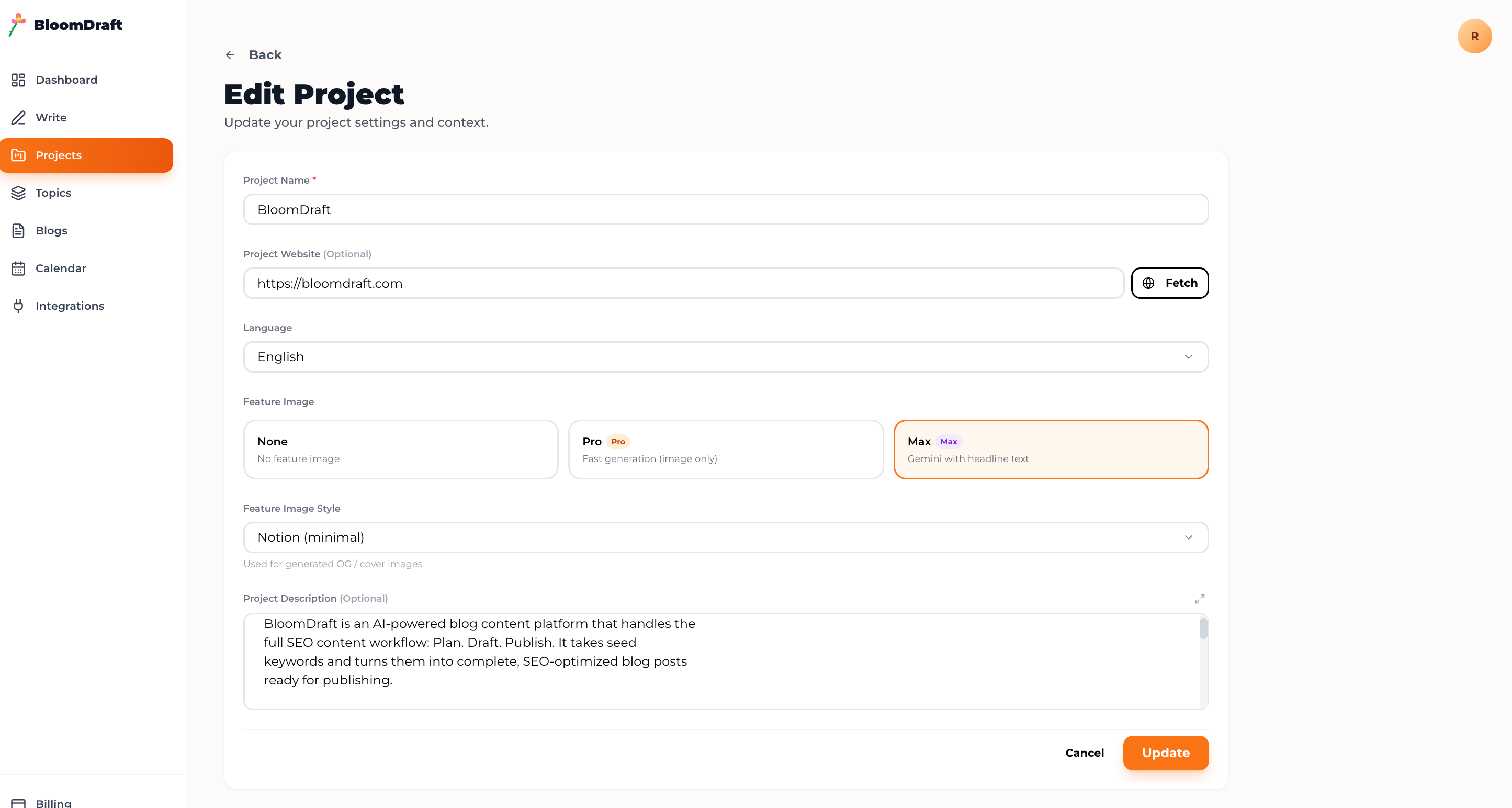 BloomDraft’s core idea is simple: projects are context containers. A post created inside a project inherits the project’s context automatically.
Here’s a tight setup that matches the checklist above.
1) Create a project and add the non-negotiables
Add the project name, site URL, language, and a product description that states audience + problem + outcome. Keep it to 4–6 sentences; long descriptions tend to turn into mush.
If your homepage explains the product clearly, use BloomDraft’s fetch-from-URL option to pull initial context, then edit it into something you’d actually ship.
2) Name the features you want content to mention
Don’t write “content management.” Write what the reader will see.
For BloomDraft examples, that might be:
- Topic clusters (planning related posts around one keyword)
- Content calendar (status + scheduling)
- Direct publishing (WordPress/Ghost/custom API)
This is how you avoid the dreaded “tools and platforms can help” filler.
3) Set consistency defaults once
Small defaults remove dozens of micro-decisions later.
In BloomDraft, that can include:
- Default feature image style (so visuals don’t zig-zag between posts)
- Publishing settings per project (so Project A doesn’t accidentally post to Project B)
Managing multiple brands/products without stepping on rakes
The moment you run more than one site, context becomes a correctness problem—not a style preference.
Project separation prevents:
- Context collision (wrong features, wrong audience, wrong examples)
- Voice drift (one brand starts sounding like another)
- Cross-posting mistakes (publishing to the wrong CMS or category set)
A practical workflow (works in BloomDraft or anywhere):
- One project per product/brand/client. No exceptions.
- Generate inside the project only. Treat it like the “right room.”
- Review for claims and screenshots. Keep the edit pass focused on truth, not tone repair.
- Track status in one place (draft → scheduled → published), with filters by project.
- Batch work by project (plan 5 posts, generate 5 drafts, edit 5 drafts). Context switching is the silent killer.
Example: if you manage a developer tool and an e-commerce agency, you don’t just need separate keywords—you need separate metaphors, examples, and assumptions. Projects enforce that boundary.
What changes for small teams
When you’re a solo founder or a two-person team, the goal isn’t “more content.” It’s fewer rewrites.
With solid project context for AI content, edits tend to shift from “replace every generic paragraph” to “tighten, fact-check, add one better example.” That’s the difference between content you avoid and content you can publish weekly.
If you want the fastest win: create one project, paste the template, and regenerate a post you previously had to heavily rewrite. The gap is obvious when you see it in your own voice.